
Search engine optimization has changed a lot over last decade. It is always difficult to decide which platform to choose as we have a lot of options these days like Wix, Shopify, WordPress and more. Yes, this is true that WordPress is better than another platform in term of search engine optimization. Either you want to reach more people, weather your goal is to inform reader, entertain or sell products online, WordPress makes it simple with unlimited easy to use features especially if you are non tech guys.
So, let’s get started with all the information you required to make a SEO friendly website.
-
Choose Your Hosting Provider Carefully:
This is the very first and important step to make a successful wordpress website. Hosting plays an important role in term of speed optimization. As a digital agency we know how important speed is for Google as it takes speed into account when ranking site and it also an important factor for optimized website user experience. From our years of experience we will suggest you to do research spend some time before buying any hosting plan. Make sure that plan include HTTPS certification as well. One of the hosting companies which we do not recommend is Go Daddy on the other hand you can go with Hostinger as it is cheap, efficient, reliable and easy to use.
-
Pick Theme Carefully:
Picking theme is important because it determine the appearance and outlet for your website. As an example, if you are making news website there will be a different theme and for ecommerce it will be something else. Coding is different for different theme. This can affect your website speed so choose your theme accordingly.
-
Use a Dedicated SEO Plugin:
Plugin are small piece of code which you can add to your website to enhance it performance. WordPress have number of SEO plugins to choose but the best one which we recommend is not Yoast. Yes, you might get surprised after reading this but MathRank is improved and more advance plugin for SEO as compared to Yoast. It has many features which can take your SEO a step ahead in the game. You can add optimize your every individual page by using it.
-
Optimize Permalink Structure:
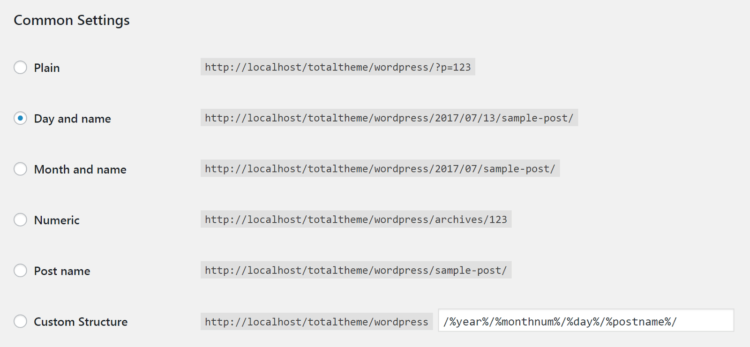
WordPress have the option to structure your Permalink. It is a permanent link of page, product, or post of your wordpress website. Google prefer clear, descriptive links that describes about the content on your webpage. This can lead you one step closer to get ranked on SERP.
WordPress offer number of auto-generated permalink options:
-
Optimize Title Tags:
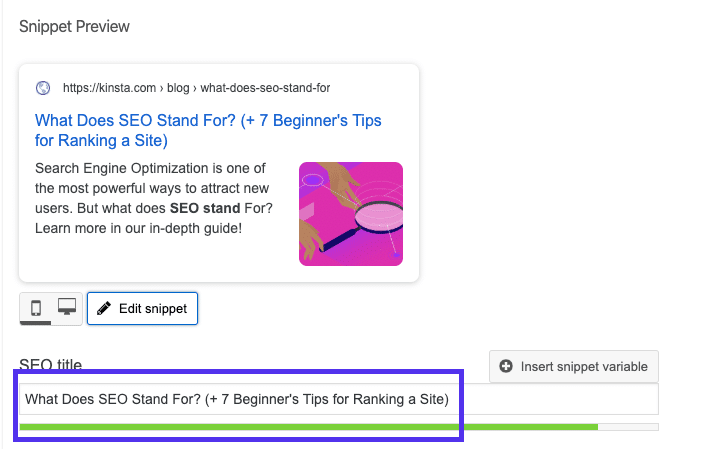
Adding title tags is not a big rocket science with WordPress, you don’t need any coding or tech guy for that. Placing keyword as Title tag, not only boost SEO but also provide information to user what blog post is about. Hence, it increases Click Through Rate.
So, how can you add Keywords in your Title Tags?
Most SEO plugin provide this feature they follow Google guideline. Google can only show characters with 600 pixels and 60 – 65 characters in the title tags if you will add more characters the searcher cannot see your full title on SERP.
-
Optimize Meta Description:
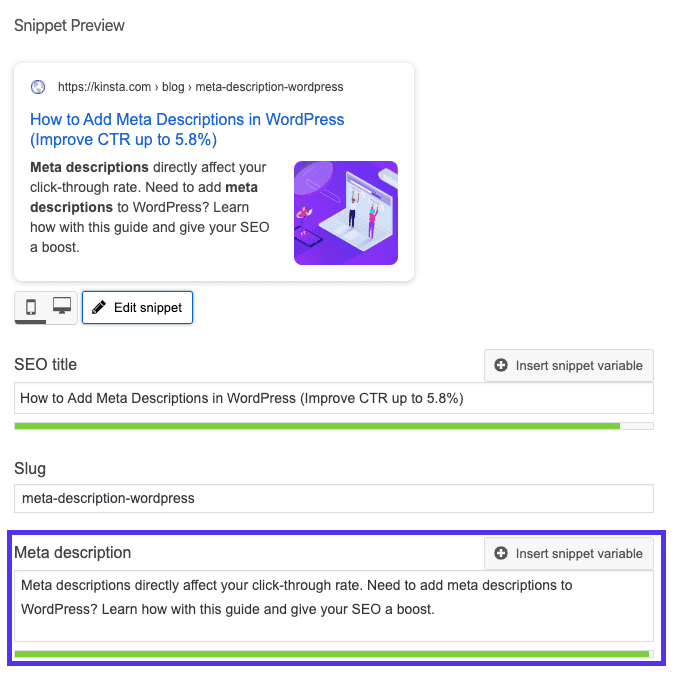
Meta Description plays an important role in increasing CTR. A well written description can dramatically increase your click through rate. Higher the CTR, higher the traffic you are going to get on your website. Adding Meta tag to a page or a post is as simple as adding title tags. You can set your Meta description manually by using SEO plugin like Yoast or Math Rank.
The current character limit in 2022 for the Meta description by Google is in between 150 to 170 characters.
Conclusion:
With wordpress highly advance and easy to use dashboard you can easily optimize your web page without any coding or technical skills. To get higher ranked on SERP you don’t need to be a SEO expert. You just have to follow and implement few simple tips. By following above tactics you can achieve your goals of increasing traffic and higher ranking.
Published By: Amanveer Singh Pathania